Live streaming helps businesses engage global audiences with low latency. Cloud-based streaming costs less up front than traditional broadcasting and scales to match your needs. By using serverless Amazon Web Services (AWS) services, you can automatically scale resources to match your exact streaming needs, spinning up channels for major events and efficiently cleaning up afterwards.
AWS Elemental MediaLive is a cloud-based, broadcast-grade video processing service you can use to deploy live channels within minutes. This post shows you how to automate MediaLive channel scheduling for both planned and one-time broadcasts, reducing operational costs and overhead while enabling your live streams to start and stop exactly when needed.
This solution uses a scalable, serverless architecture that automates channel management with AWS Lambda and Amazon EventBridge. You can concentrate on creating engaging viewer experiences while the infrastructure automatically manages streaming complexities.
The solution uses these key AWS services:
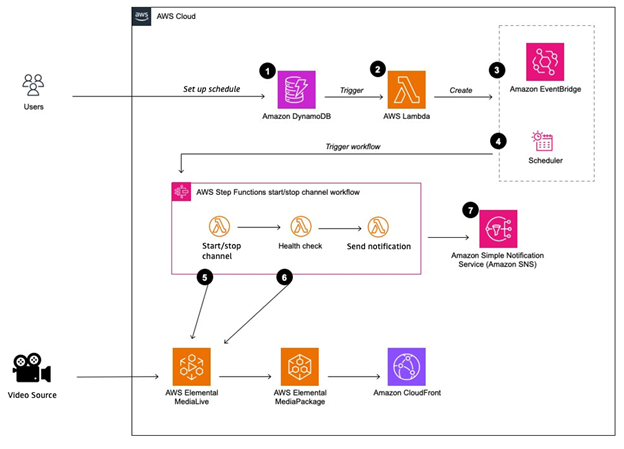
Figure 1 shows the architecture for this solution.
Figure 1: High-level architecture for the solution with serverless application.
Before you begin, ensure you have the following:
In this section, we walk you through the steps to schedule MediaLive channel operations with AWS EventBridge. The walkthrough follows these high-level steps:
Complete the steps in the following sections.
To deploy the solution using AWS CDK, on the AWS Management Console, navigate to AWS CloudShell, as shown in the following screenshot.
Figure 2: AWS CloudShell icon on the console navigation bar.
Enter the following command to install the stack:
Figure 3: Paste the command into the CloudShell console.
The deployment takes approximately 5 minutes. When it’s complete, you receive a confirmation message, as shown in the following screenshot.
Figure 4: Successful deployment confirmation.
In this step, you define the criteria to automatically start and stop a MediaLive channel. Each schedule entry applies to one specific MediaLive channel and includes stream health monitoring so your channel runs properly beyond basic start and stop operations.
To create a schedule entry, follow these steps:
Figure 5: DynamoDB tables list showing media-scheduler table.
Figure 6: Table exploration view.
Figure 7: Create item in the table.
mediaChannelId: This is the unique MediaLive channel ID and can be obtained from the MediaLive console. Each entry schedules one specific channel. For more information, visit Viewing a channel configuration.
startDateTime and endDateTime: Input a date time in ISO8601 format. The automation will start and stop accordingly.
manifestUrl: Enter your HTTP Live Streaming (HLS) or Dynamic Adaptive Streaming over HTTP (DASH) manifest URL. The automation will verify the connectivity after the channel is started. You will be notified if the health check fails.
Choose JSON view and confirm that the input values are correct, then choose Create item, as shown in the following screenshot.
Figure 8: JSON configuration for schedule entry.
You have now added your schedule.
After you add your schedule entry to the table, DynamoDB triggers Step Functions through EventBridge. The system automatically creates an EventBridge schedule based on the table data.
To view these scheduled events:
The following screenshot shows the Schedule tab with the configuration and status information.
Figure 9: EventBridge schedule details.
Note: The Amazon EventBridge schedule is automatically removed after it starts.
Ten minutes before your scheduled start time, EventBridge triggers the WorkflowStateMachine.
To monitor workflow execution:
If the health check fails, you receive an SNS notification with error details. The following diagram shows a complete workflow execution in Step Functions.
Figure 10: A complete workflow execution in Step Functions.
To avoid incurring future charges, delete the CDK or CloudFormation stack named ElementalMedialiveAutomationStack, which you deployed in Provision required AWS components.
This serverless solution automates AWS Elemental MediaLive channel management with AWS Lambda, Amazon EventBridge, and AWS Step Functions. You control costs by only running channels when needed.
This automated approach delivers two key benefits:
This architecture provides a foundation for organizations to scale their streaming capabilities while minimizing operational overhead.
If you need further information, create an issue on this GitHub repository or contact your account team.